


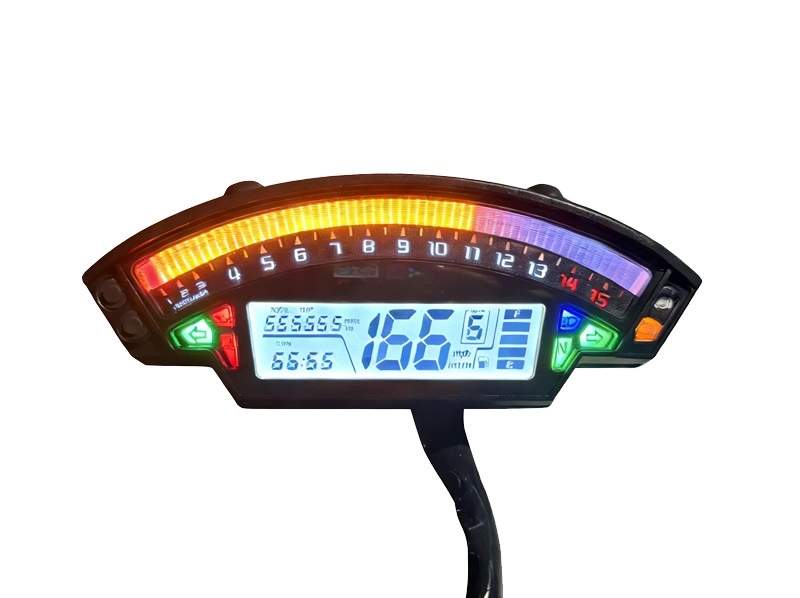
BH-METER Factory Wholesale OEM Original Digital Dashboard Speedometer Tachometer Cluster For Kawasaki Ninja ZX-10R
Professional digital instrument system specifically designed for Kawasaki Ninja ZX-10R motorcycles, featuring advanced display technology and precise measurement capabilities for optimal riding performance monitoring.
Installation Steps
◎ Turn off the motorcycle power supply (remove the key) and ensure a safe installation process;
◎ Locate the original dashboard wiring connector of the motorcycle, and remove the old dashboard plug;
◎ According to the "wiring diagram instructions", connect the wiring of this product to the motorcycle wiring one by one (it is recommended to wrap the interface with insulating tape to prevent loosening);
◎ First connect the "ground wire (green)" and "positive power wire (black)", and test if the screen lights up normally when powered on;
◎ Test if the turn signal, gear display, and oil level signal functions are normal, and confirm there are no errors before fixing the dashboard;
◎ After installation is completed, start the motorcycle and check if all functions respond synchronously.
Button Adjustment
◎ Short-press the Up Key to switch between TOTAL and TRIP.
◎ When on the TOTAL interface, long-press the Up Key for 3 seconds to switch between metric (KM/H) and imperial (mph) units. The default is metric. The setting is retained even after a complete power outage.
◎ When on the TRIP interface, long-press the Up Key for 3 seconds to clear the TRIP data.
◎ When a water temperature sensor is connected: Short-press the Down Key to switch between clock, voltmeter, and water temperature display.When there is no water temperature sensor: Short-press the Down Key to switch between clock and voltmeter.
◎ The oil meter prompts every 2000km. When the oil meter light is on, switch to the TOTAL interface. Press and hold both the Up and Down Keys for 3 seconds to turn off the oil meter light and start a new counting cycle.
Clock Adjustment
When on the clock interface, long-press the Down Key for 3 seconds to enter the clock setting mode. It uses a 24-hour system, and the cold start defaults to 00:00. The hour digit flashes (adjustment range: 00-23), while the second digit does not flash. Short-press the Up Key to increase the hour by 1, and short-press the Down Key to switch to the flashing minute digit (adjustment range: 00-59). The second digit still does not flash. Then, short-press the Down Key again to save and exit, or it will save and exit automatically after 10 seconds of no operation, or save and exit automatically when the power is turned off.
Precautions
1. To avoid damage to the product due to incorrect wiring, please consult a motorcycle mechanic if you have no installation experience.
2. Each of our products undergoes testing before shipment. After installation, if some functions are not working properly, please first check if the wiring connections are correct and secure. If the problem persists, please consult a mechanic. If the mechanic's inspection reveals that the dashboard is indeed damaged without cause, please contact our after-sales staff.
Related Products
Just leave your email or phone number in the contact form so we can send you a free quote for our wide range of designs!
Add: Room 1003, 10th Floor, Building 3, Wanyang Innovation City, Jiangdu West Road, Duruan Town, Pengjiang District, Jiangmen City, Guangdong Province, China