loading

Baihang - Development, customization, and production of motorcycle speedometers and PCB boards.

YS12Motorcycle Dashboard for Yamaha Fazer 150 Digital Instrument Panel 1
YS12Motorcycle Dashboard for Yamaha Fazer 150 Digital Instrument Panel 2
YS12Motorcycle Dashboard for Yamaha Fazer 150 Digital Instrument Panel 3
YS12Motorcycle Dashboard for Yamaha Fazer 150 Digital Instrument Panel 4
YS12Motorcycle Dashboard for Yamaha Fazer 150 Digital Instrument Panel 5
YS12Motorcycle Dashboard for Yamaha Fazer 150 Digital Instrument Panel 6
YS12Motorcycle Dashboard for Yamaha Fazer 150 Digital Instrument Panel 7
YS12Motorcycle Dashboard for Yamaha Fazer 150 Digital Instrument Panel 1
YS12Motorcycle Dashboard for Yamaha Fazer 150 Digital Instrument Panel 2
YS12Motorcycle Dashboard for Yamaha Fazer 150 Digital Instrument Panel 3
YS12Motorcycle Dashboard for Yamaha Fazer 150 Digital Instrument Panel 4
YS12Motorcycle Dashboard for Yamaha Fazer 150 Digital Instrument Panel 5
YS12Motorcycle Dashboard for Yamaha Fazer 150 Digital Instrument Panel 6
YS12Motorcycle Dashboard for Yamaha Fazer 150 Digital Instrument Panel 7

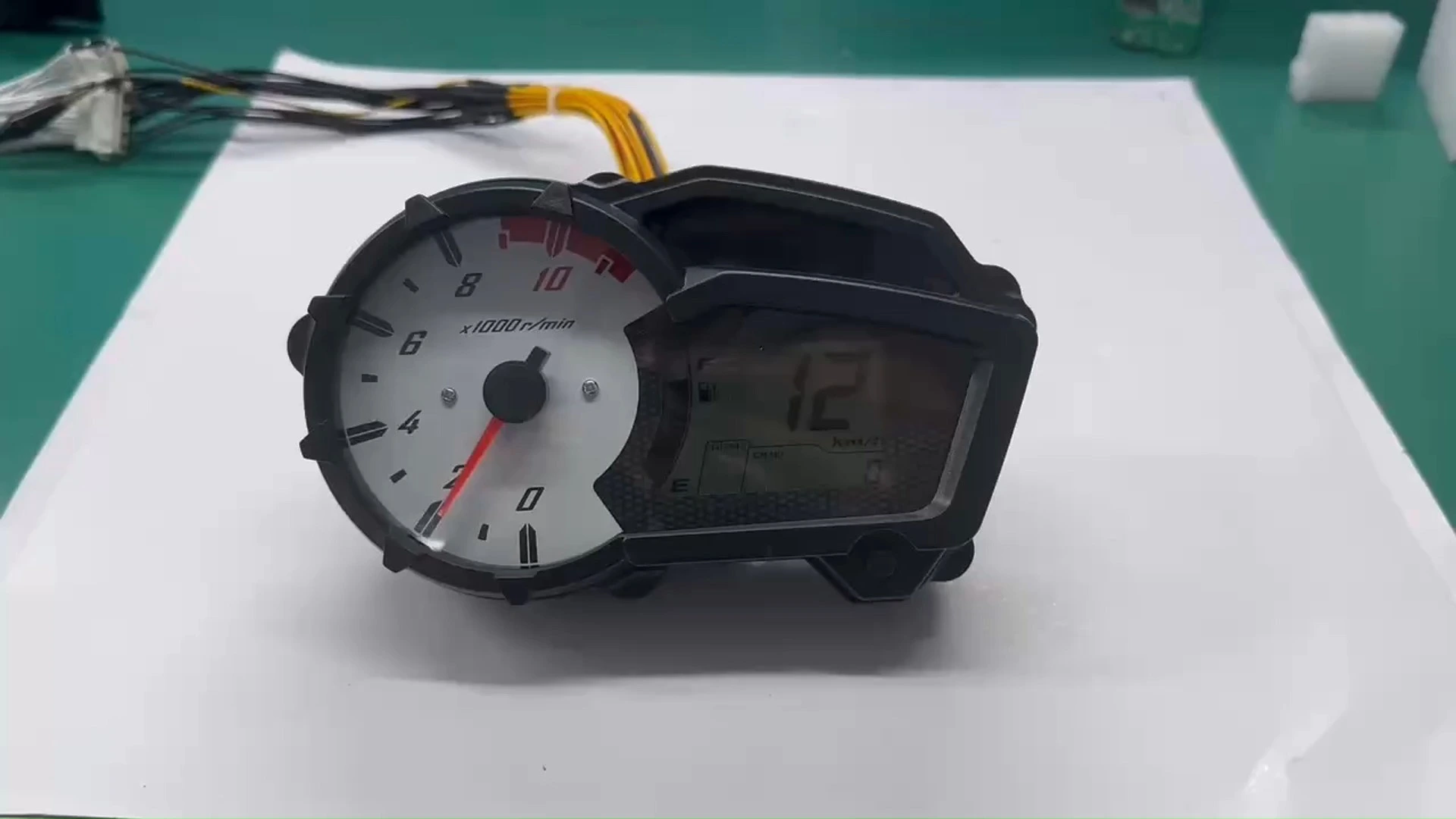
YS12Motorcycle Dashboard for Yamaha Fazer 150 Digital Instrument Panel

Comprehensive digital dashboard system specifically designed for Yamaha Fazer 150 motorcycles, featuring advanced display technology with multiple functional zones for optimal riding data presentation and system monitoring.

Compatible Models: YS125, XTZ150, XTZ150 Crosser
5.0
Purchase discount:
Over 40pcs:10% off | 100-300pcs:20% off | Above 300pcs:VIP 7.8% off + Free sample shipping
Brand:
Baihang
Factory Price:
25USD
Shipping Cost:
Negotiation
Delivery Time:
It depends on the region
Payment Terms:
T/T, Paypal
MOQ:
20 pcs
ODM & OEM:
Available( MOQ:2000 PCS ,can buy in batches, but you need to sign a contract)
design customization

    oops...!

    no product data.

    Go to homepage

    Installation Steps

    Method 1: Ensure motorcycle power is completely off for installation safety.

    Method 2: Locate original dashboard wiring interface and disconnect.

    Method 3: Connect wires according to provided diagram (insulating tape recommended).

    Method 4: Test screen with ground and positive wires connected.

    Method 5: Verify all functions before final mounting.

    Method 6: Start motorcycle after installation to confirm operation.

    01 (10)
    011

    Button Adjustment

    ◎  Speed: Maximum display speed is 199 km/h.

    ◎  Mileage: Total mileage (ODO) maximum display is 999,999 km, and trip mileage (TRIP) maximum display is 999.9 km.

    ◎  Fuel Level: Displays fuel level with 6 segments.

    ◎  RPM: Maximum RPM is 11,500 r/min, indicated by a stepper motor.

    ◎  Indicator Lights: Left turn is green, right turn is green, high beam is blue, neutral is green, ECO light is green, and fuel injection is yellow.

    ◎  Gear Position: Displays gear positions from 1 to 5.

    ◎  Backlight: White LCD backlight.

    ◎  Button Adjustment: In the total mileage mode, a short press switches between total and trip mileage; in trip mode, a long press resets the trip mileage, and a short press switches back to total mileage.

    Precautions

    1. To prevent wiring mistakes damaging product, consult mechanic if inexperienced.

    2. Products tested before shipment. Check wiring connections first if issues arise. Contact after-sales service if panel found defective.

    5 (26)
    5 (26)
    4 (26)
    4 (26)
    3 (28)
    3 (28)

    Related Products

    no data
    Contact Us
    Get in touch with us

    Just leave your email or phone number in the contact form so we can send you a free quote for our wide range of designs!

    no data
    Jiangmen Baihang Technology Co., Ltd. specializes in motorcycle LED & LCD instruments.11 years’ experience, 350+ models, OEM & customization supported.
    no data
    Phone: +86 185 7506 5015
    Add: Room 1003, 10th Floor, Building 3, Wanyang Innovation City, Jiangdu West Road, Duruan Town, Pengjiang District, Jiangmen City, Guangdong Province, China
    Contact us
    whatsapp
    Contact customer service
    Contact us
    whatsapp
    cancel
    Customer service
    detect